Perform a Manual Backup
Typically, backups are performed automatically and are controlled by the schedule settings. In addition to the scheduled backup, a manual backup provides you the option to back up your sources on a need basis. For example, if you have a repeat schedule for Full and Incremental backups and you want to make major changes to your machine, you must perform an immediate manual backup without waiting for the next scheduled backup to occur.
Follow these steps:
- Log into Arcserve Cloud Console.
- Navigate to Protect > Sources.
- The list of sources displays on the center pane.
- From the Action drop-down list of a source that you want to backup, click Start Backup.
- The Start Backup dialog opens.
- On the Start Backup dialog, select the type of backup you want to perform, specify the backup name if required, and then select the type of schedule from the Schedule Type drop-down list.
-
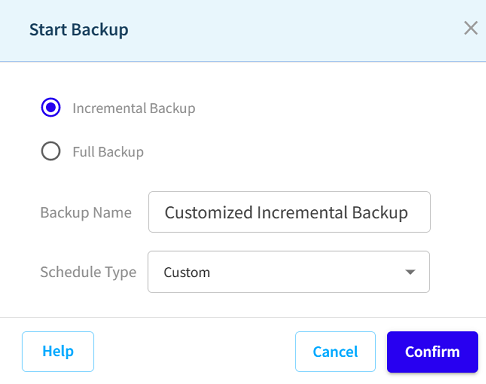
- The available backup types are:
- Notes:
- You can also run backup manually from the Sources page.
- If no backup name is specified, by default, it is automatically named as Customized Full or Incremental Backup.
- Click Confirm.
- The backup job starts successfully.
- To monitor the backup jobs, navigate to Reports > Jobs.
- Wait until the backup job is finished.
- Note: Only one job can be run at a time. If you manually attempt to launch a backup job when another job is currently running, an alert message informs you that another job is running and requests that you try again at a later time.
Incremental Backup
Initiates an Incremental Backup of your machine. An Incremental Backup backs up only those blocks that have changed after the previous backup.
Note: If you are performing a backup for the first time, the full backup gets initiated automatically even though you selected the Incremental Backup option.
The advantages of Incremental Backups are that it is a fast backup and produces a small backup image. This is the most optimal way to perform backups.
Full Backup
Initiates a Full Backup of your entire machine or the selected volumes.
The manual backup is successfully performed.