Perform RPS Jumpstart
RPS Jumpstart allows you to migrate recovery points from a specific data store to another data store to the same RPS.
Note: The RPS jumpstart supports migrating a read-only data store to a writable data store or normal data store, but vice-versa is not supported.
Follow these steps:
- On the Protect screen, do one of the following:
- Navigate to Destinations > Recovery Point Servers.
- From the list of recovery point servers, click the Action drop-down list of a specific recovery point server, and then select RPS Jumpstart.
- Navigate to Destinations > Data Stores.
- From the Action drop-down list of a specific data store, select RPS Jumpstart.
- The RPS Jumpstart screen appears.
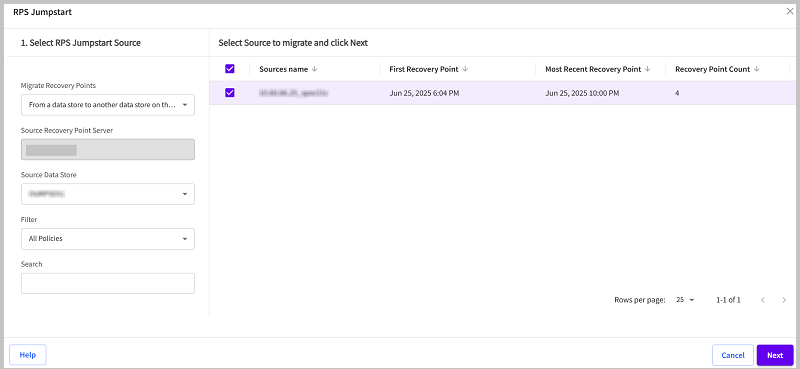
- On the RPS Jumpstart screen, under 1. Select RPS Jumpstart Source, do the following:
- From the Migrate Recovery Points drop-down list, select From a data store to another data store on the same Recovery Point Server.
- The Source Recovery Point Server gets automatically generated.
- From the Source Data Store drop-down list, select the source data store as needed.
- From the Filter drop-down list, select the policy as needed. By default, All Policies is selected.
- A list of sources appears in a table.
- From the table, select the check boxes for the sources you want to migrate, and then click Next.
-
- On the RPS Jumpstart screen, under RPS Jumpstart - 2. Select RPS Jumpstart Target, from the Target Data Store drop-down list, select the target data store as needed.
- Notes:
- The Target Data Store drop-down contains only a list of running data stores.
- Recovery Point Server does not support migrating data from an encrypted data store to a non-encrypted data store, or from a deduplication data store to a non-deduplication data store.
-
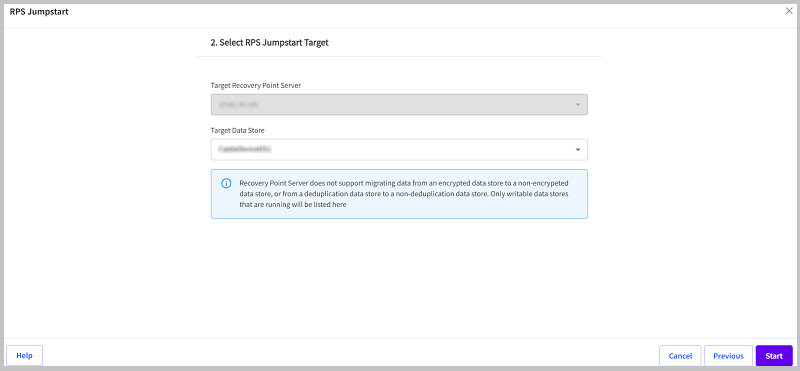
- Click Start.
- The RPS jumpstart job starts successfully.
 From the Recovery Point Servers View
From the Data Store View
From the Recovery Point Servers View
From the Data Store View