Assigning ShadowStream Jobs
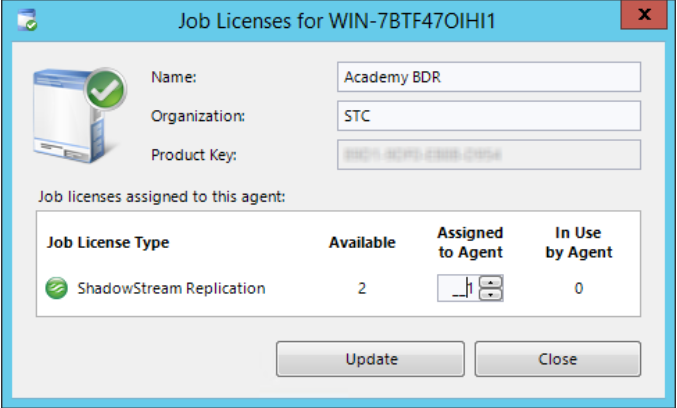
ImageManager can be configured to use ShadowStream replication after it is activated. The assignment of jobs is accomplished through the Job Licenses dialog for ShadowStream Replication. ImageManager licenses for ShadowStream are listed in the Job Licenses dialog box after they are activated:
|
Field |
Description |
| Available | Shows the total number of purchased ShadowStream jobs. This pool is available to all ImageManager agents. |
| Assigned to Agent | Shows the number of the purchased ShadowStream jobs assigned to the selected agent.
Use the Assigned to Agent column to dynamically assign jobs or modify their assignments. Use the selector to specify or modify the assignment. Click Update to reflect the new assignment.
Note: You cannot reduce the number assigned to this agent to less than the number already in use by jobs for this agent. If you need to do so, you must delete those job(s) first in order to reduce this number. |
| In Use by Agent | Shows the number of jobs actually in use by ImageManager for this selected agent. |