How can I assign a custom MTU value to a PortGroup
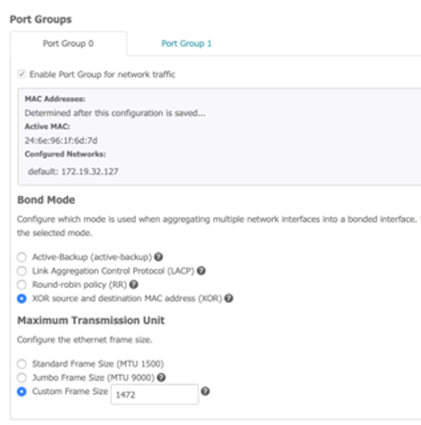
Beginning with the OneXafe 3.1 (OneSystem 1.6) release, admins have been able to set a custom MTU size for a given port group through exconsole and admins could select either 1500 or 9000 MTU through the web console. In this 3.1.2 release, this option is now available in the web console.
Custom MTU values should be used cautiously. After the setting is applied, admins can check # show interfaces to see if there are errors or dropped packets. Note, the example below is a subset of the network interfaces when using
# show interfaces in the exconsole.
Copyoneblox50001(config-network) portgroup
Portgroup Enable Mtu Bondmode Xmithash
0 true 1472 balance-xor
1 true 1500 802.3ad layer3+4
oneblox50001(config-network) show interfaces
bond0: flags=5187<UP,BROADCAST,RUNNING,MASTER,MULTICAST> mtu 1472
inet 172.19.32.127 netmask 255.255.255.0 broadcast 172.19.32.255
inet6 fe80::266e:96ff:fe1f:6d7d prefixlen 64 scopeid 0x20<link>
ether 24:6e:96:1f:6d:7d txqueuelen 1000 (Ethernet)
RX packets 12334008 bytes 6184948906 (5.7 GiB)
RX errors 0 dropped 0 overruns 0 frame 0
TX packets 3795977 bytes 1837014316 (1.7 GiB)
TX errors 0 dropped 5 overruns 0 carrier 0 collisions 0
docker0: flags=4099<UP,BROADCAST,MULTICAST> mtu 1500
inet 172.17.0.1 netmask 255.255.0.0 broadcast 172.17.255.255
ether 02:42:c4:f3:4f:ef txqueuelen 0 (Ethernet)
RX packets 0 bytes 0 (0.0 B)
RX errors 0 dropped 0 overruns 0 frame 0
TX packets 0 bytes 0 (0.0 B)
TX errors 0 dropped 0 overruns 0 carrier 0 collisions 0
em1: flags=6147<UP,BROADCAST,SLAVE,MULTICAST> mtu 1472
ether 24:6e:96:1f:6d:7d txqueuelen 1000 (Ethernet)
RX packets 0 bytes 0 (0.0 B)
RX errors 0 dropped 0 overruns 0 frame 0
TX packets 0 bytes 0 (0.0 B)
TX errors 0 dropped 0 overruns 0 carrier 0 collisions 0
oneblox50001(config-network)