Retention
SPX retention options can reduce the amount of space required for backup storage. While keeping all backup image files may provide the most options for restoring data, this policy has two drawbacks:
- Rapidly consumes available backup storage space
- Increases the complexity in determining which point-in-time file(s) to select for restoring
In practice, determine what points-in-time provide the desired protection against data loss.
Note: SPX retention policy applies to Mixed, Full, or Full Manual backup schedules. It does not apply to a continuous incremental schedule. To manage continuous incremental backup files and the space required for these files, use ImageManager.
The Retention policy options are:
|
Option |
Default Setting |
Description |
|
Keep all images |
ON |
Retains all backup image files. Note that this uses the most storage space. |
|
Keep only recent images |
OFF, 3 sets |
Specifies the maximum number of recent image sets to keep. When SPX reaches this set maximum, it deletes the oldest image set after running the next backup. The default is to retain 3 sets of backups. |
|
Keep all full backups (delete only incrementals) |
OFF |
Instructs SPX to delete only the incremental backup images when removing an old image set. |
|
Perform deletions before a full backup |
OFF |
Instructs SPX to make room for a new image set by deleting the oldest image set before creating the new image set. This reduces the total amount of disk space needed to meet the specified retention policy. However, if the backup job is interrupted or fails, then there will be fewer remaining sets for restoring the volume. Note: SPX offers this option only when there are at least two backups stored on the system. This prevents deleting the only backup if the system has retained only one backup. If the destination volume requires SPX to use less space than the required two full backups, use a Continuous Incremental backup job and ImageManager to reduce the space required. |
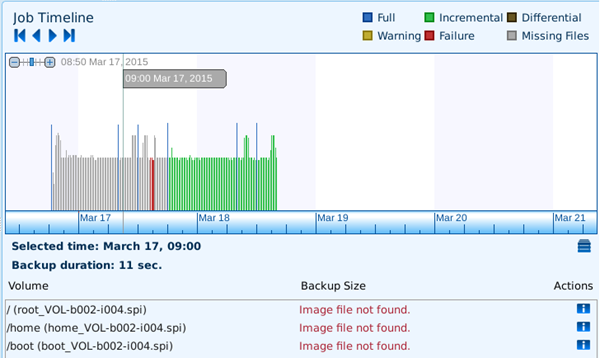
After SPX performs the retention policy and deletes one or more backup files, it still retains the name of the file and the date and time the backup occurred. It displays these deleted files in the Timeline in grey for Missing Files:
Note: Changing Retention Settings is not retro-Active. If you reduce the number of image sets, you must also manually delete the oldest sets. If retention fails to trigger, SPX will not remove the chain that was not deleted.