Offline Update using Removable Media
When Arcserve Cyber Resilient Storage is deployed as a dark site, or when policies require updates to be delivered through non-networked methods, offline updates using removable media provides a secure and auditable way to transfer approved system or application updates into the system. This process reduces exposure to external threats and ensures updates are introduced in a controlled, verifiable manner. Even in internet-connected environments, offline update procedures may still be required for sensitive components, regulated deployments, or continuity operations. Administrators can install the offline updates using removable media, such as CD‑ROMs or USB drives, to ensure that the required updates are applied as needed while maintaining immutability and security assurances.
The following command installs the Arcserve Cyber Resilient Storage updates from a removable media:
update install --offlineImportant!
Before you begin the offline update:
-
Make sure a CD-ROM or USB drive containing the update package is connected to the system. Confirm that the removable media is properly seated and recognized by the system before starting the update.
-
Make sure that only one removable media device (such as a USB drive or other external media) containing the correct update package is connected to the system. Connecting multiple removable media devices may cause the update to fail or result in the wrong update package being selected.
-
Disconnect all other removable media.
To install an offline update:
Follow these steps:
- At the command prompt, type the following command and press Enter:
-
update check --offline
-
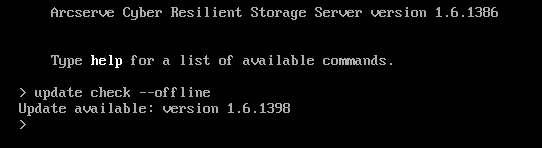
- This command checks if an update is available on the removable media and lists the available update and its version number. If no update is available, the following message is displayed:
- "No updates found."
- Now, type the following command and press Enter:
-
update install --offline
-
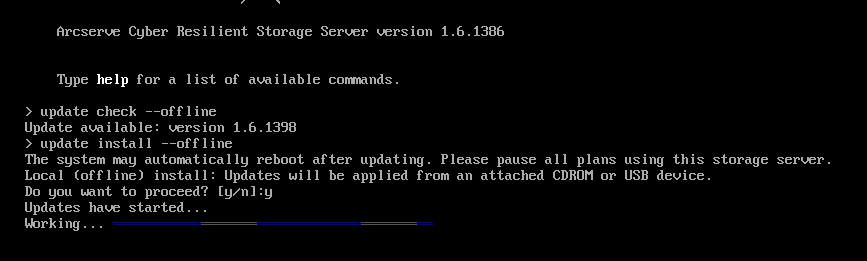
- A confirmation message appears.
- Type y to continue.
- The update process starts and a progress bar appears. After the updates are installed, the system restarts.
- Enter your credentials to sign in to the updated version of Arcserve Cyber Resilient Storage.