Configure Proxy Settings
Click Proxy Settings to specify if you want Arcserve UDP to communicate through proxy server. A proxy server acts as an intermediary between your server and the Arcserve server to ensure security and administrative control.
Follow these steps:
- On the Proxy Settings dialog, select one of the following options:
- Use browser proxy settings
- This option is only applicable to Windows Internet Explorer (IE) and Google Chrome.
- Arcserve UDP automatically detects and uses the same proxy settings as your browser to connect to the Arcserve server for update information.
- Note: Avoid using this option because of a known issue. A fix is planned for the upcoming releases.
- Configure proxy settings
- Select this option to manually configure proxy server details. If you select this option, you must also include the IP address (or machine name) of the proxy server and the corresponding port number that is used by the proxy server for internet connections.
- If you select Configure proxy settings, perform the following steps:
- In the Proxy Server field, type the IP address or hostname of the proxy server.
- In the Port field, type the port number the proxy server uses.
- (Optional) If the proxy server requires authentication, select the Proxy server requires authentication check box.
- Enter the User Name and Password for proxy authentication.
-
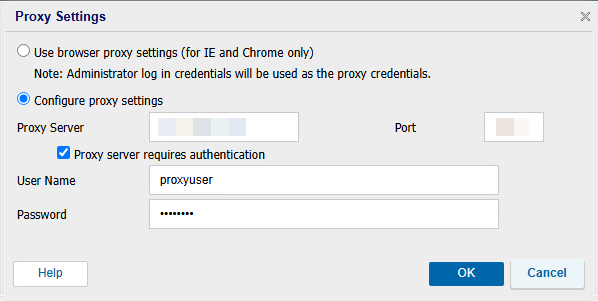
- Click OK.