Set Up a Data Store
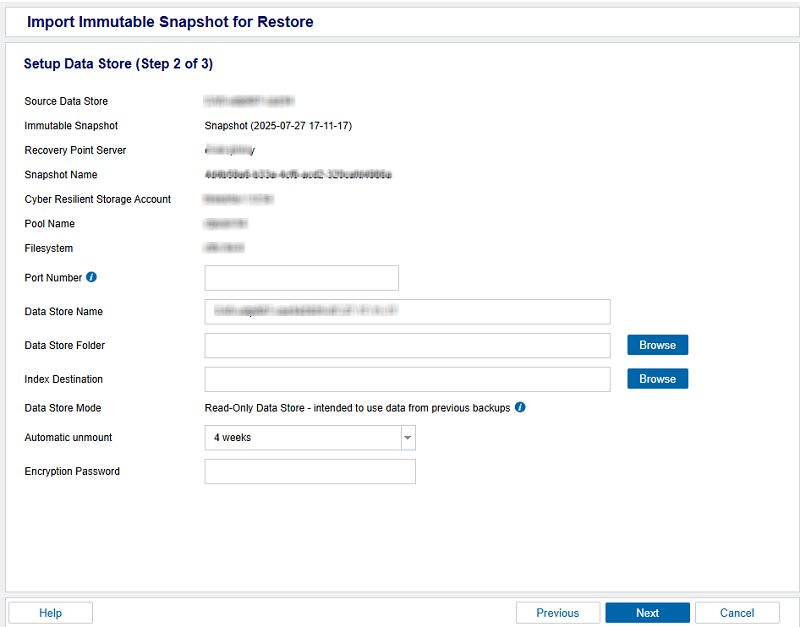
This section provides information about how to set up a data store for restore.
Note: Before you set up a data store for restore, make sure to mount snapshot and generate the port number. For more information about how to get the port number, see Mount Snapshot.
Follow these steps:
- On the Setup Data Store page, specify the following details:
- Port Number: Refers to the port number that is generated in the machine hosting the Arcserve Cyber Resilient data store.
- Data Store Name: Specifies the name of the data store.
- Data Store Folder: Refers to the location where your data will be saved. Type the local folder path or click Browse to select the desired local folder.
- Data Store Destination: Refers to the location from where you want to import the snapshot. Specify the local full path of the data store destination or click Browse to navigate and select the desired local folder.
- Note: The Data Store Destination path must be an empty folder.
- Index Destination: Defines the index destination folder to store the index files. Choose a different disk to improve the deduplication processing.
- Note: The Index Destination path must be an empty folder.
- Automatic Unmount: To unmount a cloud cyber resilient data store after a specific time, select the unmount time as needed from the available options. The available options are 1 day, 3 days, 1 week, and 4 weeks.
- Encryption Password: If the data store is encrypted, type the encryption password.
- Click Next.
-
- The Initialize Data Store for Restore page appears.