Perform Ad-hoc Replication
This section explains about how to initiate Ad-hoc replication.
Note: Before performing the Ad-hoc replication, make sure the forward replication is executed successfully. To verify whether the forward replication is successful, see Verify the Data is Replicated.
Follow these steps:
- From the Console, click the resources tab.
- From the left pane, navigate to Destinations > Recovery Point Servers.
- The list of recovery point servers appears in the center pane.
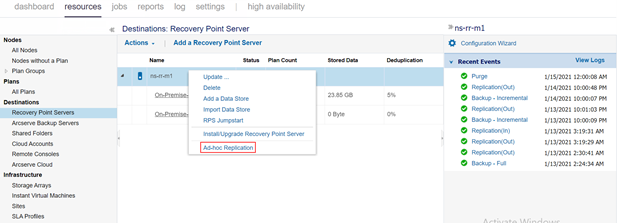
- Right-click the recovery point server, and then select Ad-hoc Replication.
-
- Wait until you get connected to the recovery point server.
- The Ad-hoc Replication : xx-xx-xx (Recovery Point Server) dialog opens.
- On the Source - Datastore Selection page, do the following:
-
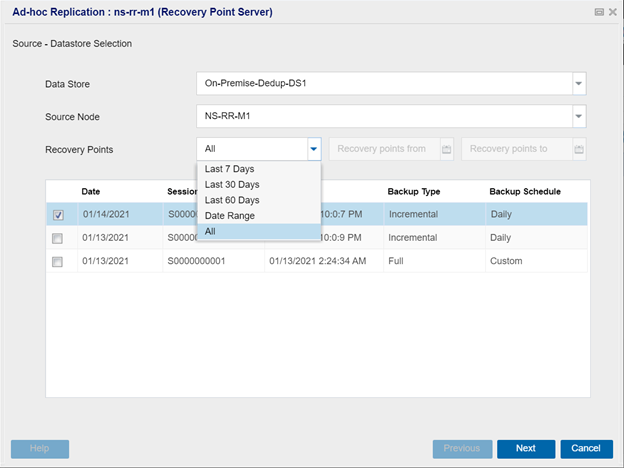
- Data Store – Select the source data store from the drop-down list.
- Source Node – Select the source node from the drop-down list.
- Recovery Points – Do one of the following:
- If you want all the recovery points you backed up to display, select All from the drop-down list.
- If you want the recovery points to display for a specific duration, select one of the following from the drop-down list:
- Last 7 days
- Last 30 days
- Last 60 days
- Date Range
- Note: If you selected the Date Range, set the date on Recovery points from and Recovery point to fields.
- All the associated recovery points between the specified duration are displayed.
- From the table, click the checkboxes to select one or more recovery points.
- Click Next.
- On the Destination page, do the following:
-
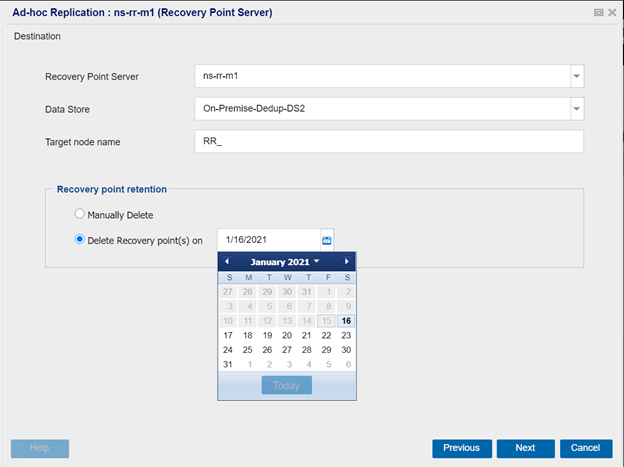
- Recovery Point Server – Select the destination recovery point server from the drop-down list.
- Data Store – Select the destination data store from the drop-down list.
- Target node name – Type a target node name of your choice.
- Recovery point retention – Delete the recovery points in one of the following ways:
- To delete recovery points manually, select Manually delete option.
- If you want the recovery points to get deleted automatically, select the Delete Recovery point(s) on option, and then specify the date. All the recovery points corresponding to that date get deleted automatically.
- Click Next.
- On the Advanced Configuration page, do the following:
-
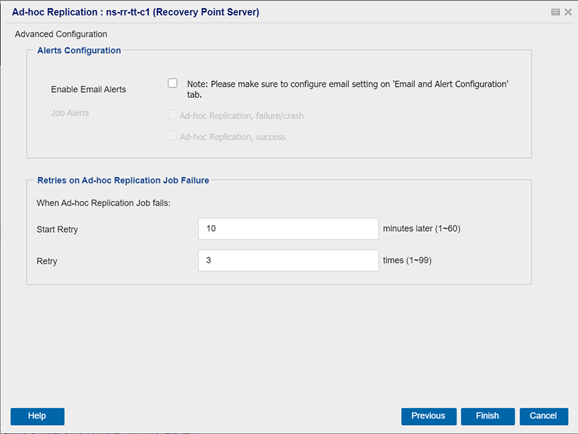
- For Alerts Configuration
- Enable Email Alerts
- Lets you enable email alerts. You can configure email settings and specify the types of alerts that you want to receive in an email. When you select the Note: Please make sure to configure email setting on ‘Email and Alert Configuration’ tab. check box, the following option is enabled for your selection:
- Job Alerts
- Lets you select the type of job alert emails that you want to receive.
- If you want to receive email alerts for Ad-hoc replication failure or crash, select the Ad-hoc Replication, failure/crash check box.
- Note: This email alert is sent with a high importance. The email alerts that have a high importance level setting display a visual indicator of an exclamation point in their Inbox.
- If you want to receive email alerts for Ad-hoc replication success, select the Ad-hoc Replication, Success check box.
- For Retries on Ad-hoc Replication Job Failure
- When the Ad-hoc Replication job fails, do the following:
- Start Retry
- Lets you specify the time (in minutes) to restart the replication job after the job fails. For example, if you specify 10 minutes, then the replication job restarts after 10 minutes of its failure.
- Limit: 1 to 60
- Retry
- Lets you specify the number of retries that you want to perform if the replication job fails. The replication job runs until the job is successful, or until the limit is reached. After the number of retries is over, the replication job runs only at the next scheduled time.
- Limit: 1 to 99
- Click Finish.
- Note: If you want to change the settings of the previous screens, click Previous, and then change the setting as needed.
- The Information dialog box appears and displays the Ad-hoc Replication Job Submitted Successfully! message.
- Click OK to close the Information dialog box.
- The Ad-hoc replication is performed successfully.