Specify the Target Machine Details
Specify the target node details so that data is restored to that node. You can restore the selected files or folders to the source node or to a new node.
Follow these steps:
- To restore to the node from where the data was backed up, follow these steps:
- Select Restore to original location on the Target Machine page.
The Host Name field in Target Machine Settings gets populated with the name of the source node.
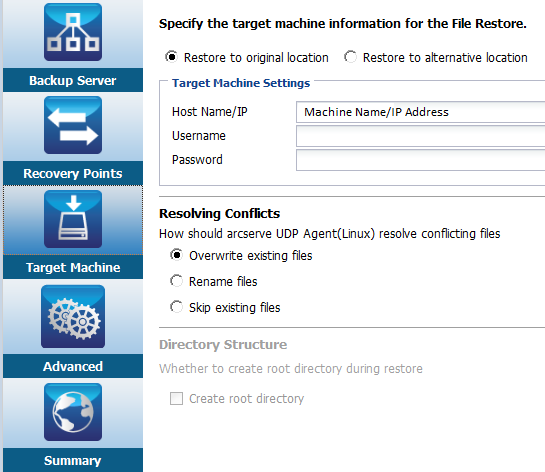
- Enter the user name and the password of the node.
- Select one of the following options to resolve conflicting files:
Overwrite existing files
Specifies that if the file exists in the target machine then the backup file from the recovery point replaces the existing file.
Rename files
Specifies that if the file exists in the target machine, then a new file is created with the same file name and .d2dduplicate<x> file extension. <x> specifies the number of times the file is restored. All the data is restored to the new file.
Skip existing files
Specifies that if the same file exists in the target machine, then those files are not restored from the recovery point.
- Click Next.
The Advanced page opens.
- To restore to a new node, follow these steps:
- Select Restore to alternative location on the Target Machine page.
The Host Name field in Target Machine Settings gets populated with the name of the source node.
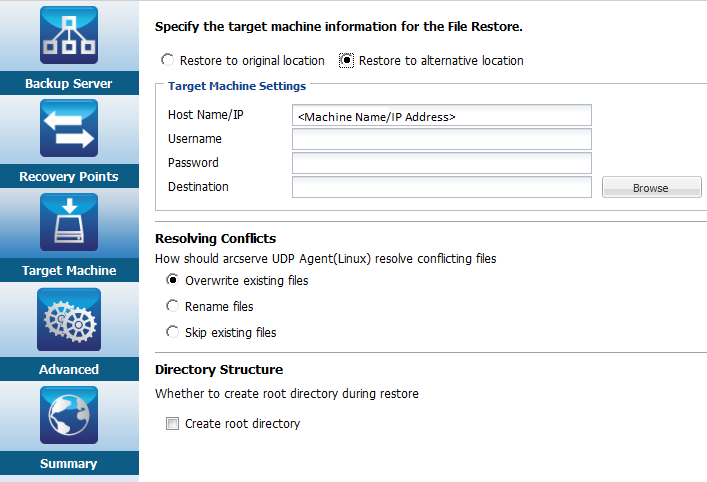
- Enter the host name or the IP address of the target node.
- Enter the user name and the password of the node.
- Enter the path where the data is restored, or click Browse to select the folder where the data is restored and click OK.
- Select one of the following options to resolve conflicting files:
Overwrite existing files
Specifies that if the file exists in the target machine then the backup file from the recovery point replaces the existing file.
Rename files
Specifies that if the file exists in the target machine, then a new file is created with the same file name and .d2dduplicate<x> file extension. <x> specifies the number of times the file is restored. All the data is restored to the new file.
Skip existing files
Specifies that if the same file exists in the target machine, then those files are not restored from the recovery point.
- (Optional) Select Create root directory.
- Click Next.
The Advanced page opens.
The target machine details are specified.