How Arcserve Backup Processes Backup Data Using Multistreaming
Note: To process two or more streams of backup data using multistreaming, you must license the Arcserve Backup Enterprise Module.
Multistreaming is a process that divides your backup jobs into multiple sub-jobs (streams) that run simultaneously and sends data to the destination media (tape device or file system device). Multistreaming is used to maximize the effective use of the client machines during backup and recovery operations. Multistreaming is useful when performing large backup jobs, since it is more efficient to divide multiple jobs between multiple backup devices.
Multistreaming lets you use all of the available tape devices on the system by splitting your backup jobs into multiple jobs using all available tape devices. As a result, it will increase the overall backup throughput compared with the sequential method.
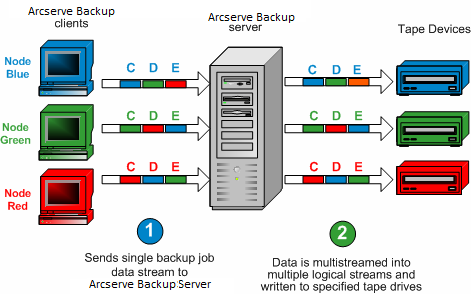
You can use all of the devices or you can specify a single group of devices. If the Arcserve Backup Tape Library Option is installed and the group with the library is selected, multistreaming uses all library devices. If the Arcserve Backup Tape Library Option is not installed, you can put devices into separate groups. For a changer, the total number of streams (child jobs) that are created depends on the number of tape devices. For a single tape drive device, the total number of streams depends on the number of device groups.
Multistreaming is performed at the volume level for regular files (two volumes can run simultaneously on two separate devices), and at the database level for local database servers. Multistreaming is performed at the node level for the Preferred Shares folder, remote database servers, and Windows Client Agents.
You can have only as many jobs running simultaneously as the number of devices or groups that are on the system. With multistreaming, one parent job is created that will trigger child jobs for as many volumes as you have. When a job is finished on one device, another job is executed until there are no more jobs to run.
Some characteristics and requirements of multistreaming are as follows:
- Each client machine can have multiple source streams, depending on the number of agents being backed up.
- Each agent can have a separate stream (one stream per agent).
- Multistreaming always requires a media pool selection to prevent the tapes from being overwritten.
- Separate tape devices should be configured in separate groups for regular drives, however for changers, they can be configured to be in the same group.
- Canceling the parent job cancels all of the child jobs. For Windows, canceling and monitoring is checked between jobs for performance considerations.
- If a job spawns child jobs, the number of child jobs spawned will not exceed the number of streams specified for the job. However, if a job spawns child jobs and you do not specify a number of streams to use, the child jobs will be created and backed up in one continuous stream.
- In the Job Status Manager, each child job has a default job description with this pattern:
- JOB[ID][Servername](Multistream subjob [SID])[Status][Start time - End time][JOB No.]
- Note: SID Represents the sub job (child) ID.
- The multistreaming option is ignored if the groups you choose have only one device, or if only one object (volume, database, or remote node) backup is submitted.
Be aware of the following:
- Backing up data using multistreaming to data deduplication devices can have an adverse affect on Tape Engine performance. For information about how you can remedy this problem, see Increase Virtual Memory Allocation to Improve Tape Engine Performance.
- You should use the same types of tape devices for multistreaming jobs. In order to achieve the optimum performance with your multistreaming jobs, you should use a high-end server machine with multiple processors and at least 256 MB memory per processor.
This section contains the following topics: