

Best Practices › Alternative Backup Approaches › How to Back up Data to an FSD in a Disk Array that is Shared Between a Primary Server and a Data Mover Server
How to Back up Data to an FSD in a Disk Array that is Shared Between a Primary Server and a Data Mover Server
This approach describes how to back up data to an FSD in a disk array that is shared between a primary server and a data mover server.
The following diagram illustrates this configuration:
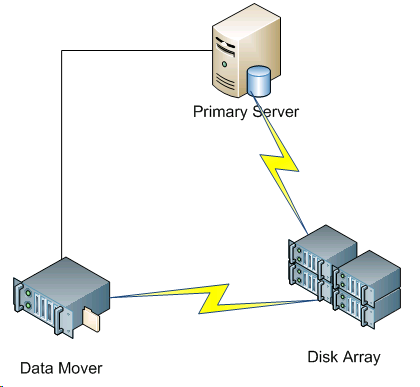
To back up data to shared disk arrays, do the following:
- Mount the disk array to the data mover server. For example:
/disks
- Mount the disk array to the primary server. For example:
X:\
- Create a file system device (FSD) on the data mover server using the following directory:
/disks/fsd
- Create an FSD on the primary server using the following directory (case-sensitive):
X:\fsd
Note: Ensure that X:\fsd references the same directory as /disks/fsd on the disk array.
- Submit your backup jobs to /disks/fsd on the data mover server.
Be aware for the following:
- You should specify a rotation scheduled job to merge the FSD from the primary server.
- If you need to restore data, merge the FSD media from X:\fsd on the primary server. You do not need to merge the media if it was merged previously.
- Run the restore job using the merged sessions.
You can then restore the sessions from the primary server to any location in your environment.
Note: To restore data that was backed up using this approach, you must merge the media relating to the FSD backup sessions and then execute the restore using the merged sessions.
Copyright © 2016 .
All rights reserved.
|
|