SPX Trial for MSPs
What You Can Do With Trial Backup Images
Trial functionality is the same as the fully licensed SPX, with the exception of system volume restores. If you want to try restoring a system volume, you can download the Recovery Environment.
The backup images created with the trial version of SPX will work with the registered version SPX when you subscribe or purchase the software.
New to SPX?
If you are an MSP and need a 30 day trail for yourself, you can have a qualifying call with a sales engineer and then fill out the form to receive your trial key. To activate a 30-day trial version see Getting a Trial Key and Activating SPX.
14-Day Trial for Your MSP Customers
If you are a registered Arcserve MSP you can offer your prospective customers a 14-day SPX trial license. You can generate license keys for your customers in the MSP portal. The process for generating an SPX trial license is the same as for generating any other key. See the instructions in the sections below.
Important: After 14 days, the free trial expires and the account will automatically be charged. At the end of the 14-day trial you MUST manually deactivate any SPX key your customer doesn't want to be charged for.
 To Generate MSP Product Keys for SPX
Before installing ShadowProtect SPX for Managed Service Providers (SPX-MSP), generate the SPX product key that can be used to activate the installation.
- In the MSP portal select Key Management from the Actions section on the left side of the interface.
-
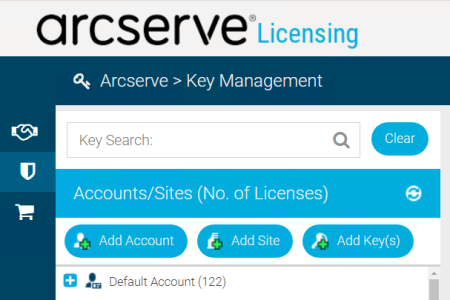
- In the Accounts/Sites panel, select (or create) the Account/Site that will be using the product key.
- In the Account Detail panel, select the tab for the product you want (e.g. ShadowProtect SPX).
- Click Add Key(s) in the Account Detail panel. This displays the Add Key(s) dialog box.
-
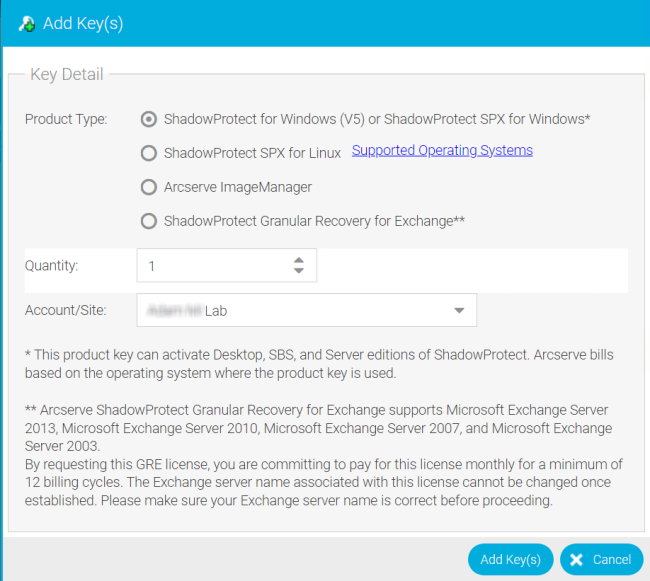
- In the Add Key(s) dialog window, select the desired options and then click Add Key(s).
- The options are:
- Product Type: The type of product key to generate.
- Product Type Options:
- ShadowProtect SPX for Managed Service Providers: Generate a ShadowProtect SPX product key. This product key can activate any ShadowProtect SPX edition (Server, SBS, or Desktop). Arcserve determines billing fees based on the installed version of Windows where the product key is used.
- ImageManager: Generate a product key that contains ImageManager job licenses. Each product key can contain up to 150 jobs for each of the following:
- intelligentFTP
- ShadowStream
- HeadStart Restore
- Granular Recovery for Exchange (GRE): Generate a product key that contains a GRE license for a specified Microsoft Exchange server. (Quantity doesn't apply to GRE.) Supply the following information:
- Exchange Server Name.
- Exchange Server Version.
- Quantity: The number of product keys (up to 10) to generate. (If applicable.)
- Account/Site: The number of product keys (up to 10) to generate. (If applicable.)
To Manage or Deactivate MSP Product Keys
After activating products you can use the integrated Key Management interface in the portal to manage or deactivate product keys.
- In the portal, click Key Management.
- Select an account from the Accounts/Sites panel.
- Select the site you want to manage from the Accounts tree.
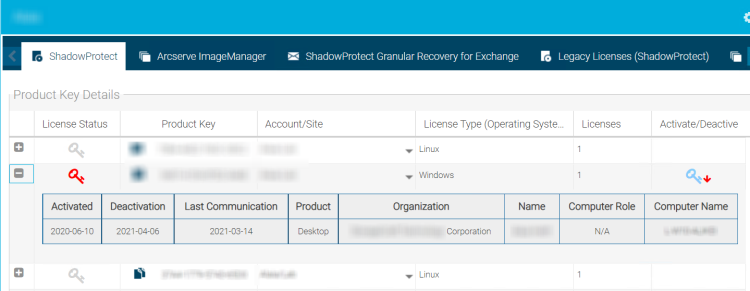
- In the Site panel, select one of the product tabs (ShadowProtect SPX, ImageManager, ShadowProtect Granular Recovery for Exchange, etc.).
-
- Key Legend
-

-

-

- The Product Key Details panel displays the list of keys for the selected product.
- Click on any of the keys in the list to display the Activation Details for that key.
- Modify the product key status as needed. The next time the product "calls home" the portal makes the changes.
- Depending on the product key type, you can do the following:
- Change the Account/Site association: (Available for all license types) You can associate the product key with a different Account or Site by selecting it from the drop-down list.
- Deactivate an SPX-MSP key: Click Deactivate to disable an SPX-MSP product key and stop it from being billed. SPX-MSP finalizes the deactivation on the next call home. Once deactivated, Arcserve no longer bills for the product key.
-
Important! Product keys are billable if they are active more than 14 days per calendar month.
- Reactivate a Deactivated SP-MSP key: Click Reactivate on a previously deactivated SP-MSP product key to bring it back on-line. Arcserve resumes billing for the product key once reactivated.