Specify the Source
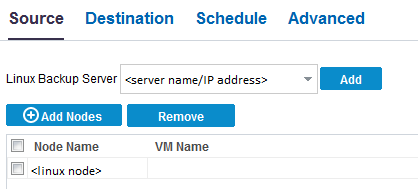
The Source page lets you specify the source nodes that you want to protect. You can select more than one nodes in a plan. If you have not added any nodes to the Console, you can add nodes from the Source page. You can save a plan without adding any source nodes but the plan will not be deployed unless you add any nodes.
Follow these steps:
- Click the Source tab.
- Select the Linux Backup Server from the drop-down list.
- (Optional) Click Add to add a new Linux Backup Server to the list.
- Click Add Nodes and select one of the following options:
- Select the nodes from the Available Nodes column and click the Add all nodes or Add selected nodes button.
- The selected nodes are displayed in the Selected Nodes column.
- Click OK to close the dialog.
- (Optional) Provide the details for the following options:
Select Nodes to Protect
Opens the Select Nodes to Protect dialog and you can select the nodes from the displayed list. Select this option if you have already added the nodes to the Console.
Adding Linux Nodes
Opens the Add Nodes to Arcserve UDP Console dialog. Select this option if you have not added the nodes and you want to manually add the nodes to protect.
If selected, UDP Archiving Node is backed up by the Linux Backup Server installed on this node itself, even if you manually select another Linux Backup Server. To back up the node by another Linux Backup Server, you could add this node as a Linux Node instead of adding as UDP Archiving Node. For more information see, how to add nodes.
Filter volumes for backup
Select either Include or Exclude from the drop-down list. Include specifies that only the specified volumes will be included for backup. Any volume that is not specified will not be backed up. Excluded specifies that the volumes will be excluded from the backup.
Files/folders to be excluded
Specify the files and folders that you do not want to backup for all the listed nodes. If you do not want to backup multiple files and folders, separate each file and folder using a colon (:). Provide the full path of the file and folder that you want to exclude.
The source is specified.